Comparison
Zotero and Copyeditor: a reference manager and a writing workspace
Zotero is a free, open-source reference manager — an adjacent tool rather than a competitor. It is where a great many researchers keep their library, and it is the strongest thing in this list at the job it does.
SIDE BY SIDE
Feature by feature
Where the other tool is stronger, the table says so. Verify anything decision-critical on both vendors’ own sites — features move on both sides.
| Feature | Copyeditor | Zotero |
|---|---|---|
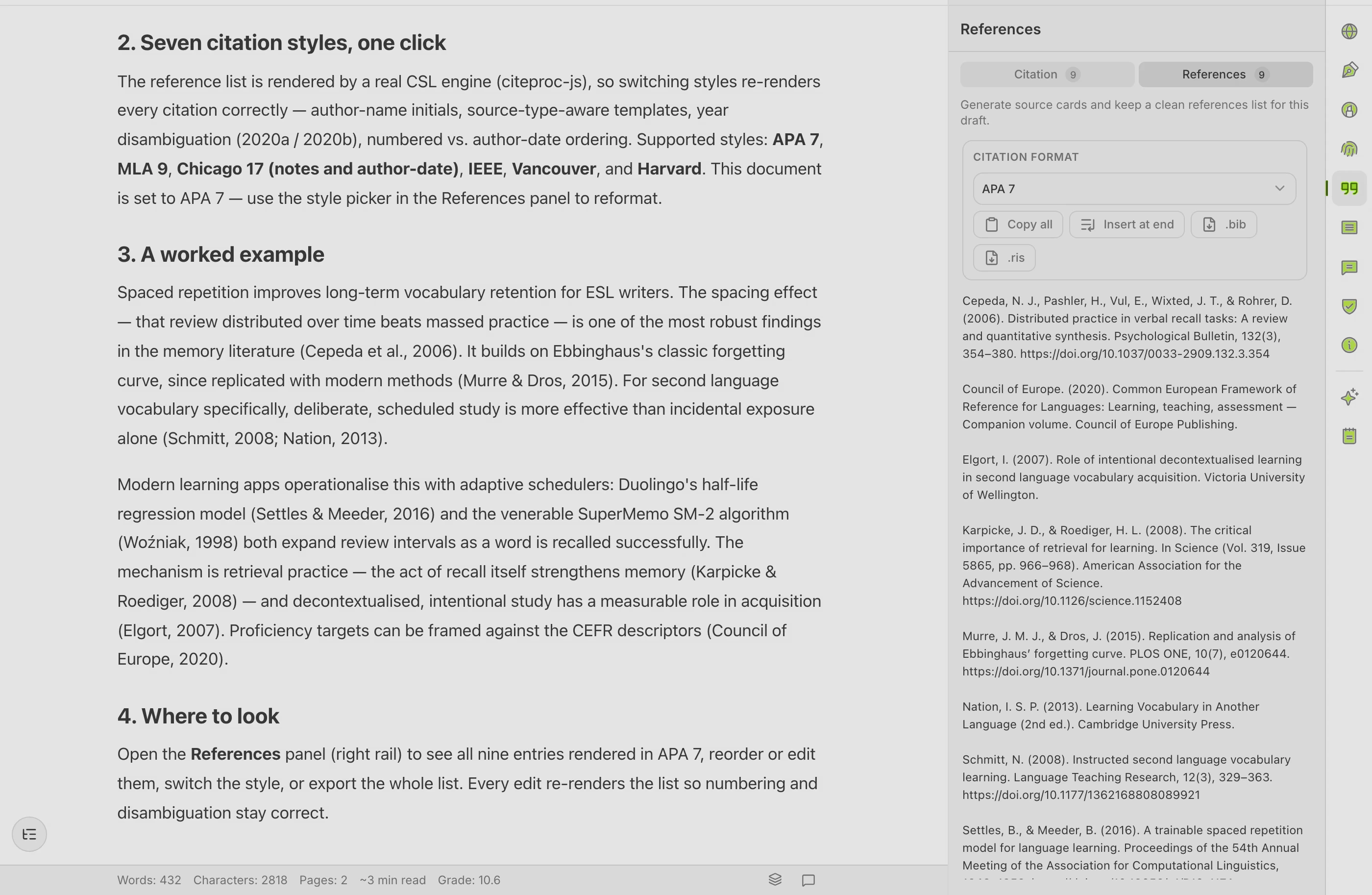
| Reference library | Sources attached to a document, not a standalone library | Full library with collections, tags and notes |
| Capturing a source from the web | Add by DOI, URL, BibTeX or RIS | One-click browser connector, with the PDF |
| Citation styles | APA, MLA, Chicago, IEEE | Thousands, via CSL |
| Cost | Paid subscription; closed beta today | Free and open source; storage optional |
| Writing and revising prose | Ask, Edit and Plan modes with academic paraphrase | Not what it does |
| Grammar review | Yes | No |
| Zotero sync | Not in the beta — on the roadmap | n/a |
| Word integration | Export to Word and PDF | Word, LibreOffice and Google Docs plugins |
| Record of authorship | Authorship Certificate anyone can verify | No equivalent |
AN HONEST READ
What Zotero does well, and where it stops
Zotero is genuinely good at
- It is free and open source with no seat limits, funded as a non-profit project rather than sold. That is a structural advantage, not a promotion.
- The browser connector is the best source capture in the category: one click on a database record, a publisher page or a news article saves a clean citable record and usually the PDF too.
- Thousands of citation styles through CSL, including the obscure one your department insists on — far beyond what any writing tool ships.
- The Word, LibreOffice and Google Docs plugins insert citations and rebuild the bibliography as you write, and switching style reformats the whole document.
- Group libraries make a shared reading list or a systematic review genuinely collaborative.
- Your data stays exportable and portable — you are never locked in.
Where it leaves an academic writer short
- It does not write, edit or review prose. That is not a criticism; it is the design.
- Cloud storage beyond the free quota is a paid add-on, though you can sync files yourself instead.
- The interface is functional rather than polished, and getting the most out of it rewards time spent learning it.
WHICH ONE
Pick the right tool for your case
Choose Zotero when
- A curated library is the center of your workflow. If you have years of tagged, annotated records in Zotero, keep them there — Copyeditor does not sync with Zotero today, and moving away would cost you more than it returns.
- You need a citation style outside APA, MLA, Chicago and IEEE. Zotero has it; Copyeditor does not.
- Budget is the constraint. Zotero is free, permanently, for unlimited references.
- You collect far more than you write — capturing, tagging and annotating sources is most of the job.
Choose Copyeditor when
- The bottleneck is producing the prose, not organizing the reading.
- You want drafting, citations and grammar review in one document instead of a manager plus a word processor plus an assistant.
- You want a verifiable record of how the document was written.
- You work mainly in one of the four supported styles and want the bibliography to build itself as you cite.
Zotero itself is free and open source with no per-reference or per-seat charge; only extra cloud storage is paid, and you can avoid that by syncing files your own way. Copyeditor is a paid subscription and is in closed beta. Check zotero.org for current storage tiers.
Questions about Zotero and Copyeditor
Does Copyeditor sync with Zotero?
No. Not in the current beta. It is on the roadmap, and until it ships you would be adding sources to Copyeditor by DOI, URL, BibTeX or RIS. If your Zotero library is central to how you work, that matters — factor it in.
Should I stop using Zotero?
No. If Zotero works for you, keep it. It is free, it is excellent at capture and style coverage, and nothing in Copyeditor replaces a properly curated library.
Can I move references from Zotero into Copyeditor?
Yes, by export. Zotero exports BibTeX and RIS, and Copyeditor imports both. That is a manual export-import, not a live sync — the two libraries will not stay in step on their own.
Is Copyeditor a reference manager?
No. Sources live with the document you are writing rather than in a standalone library you curate across projects. For library management, use a reference manager.
Which has better citation accuracy?
Both depend on the quality of the underlying record. A DOI-sourced entry is usually clean in either tool; a record scraped from a badly built publisher page needs checking wherever it lands. Always read the final reference list yourself.
Other comparisons
Copyeditor vs Mendeley
Mendeley is a reference manager and PDF reader from Elsevier — an adjacent tool rather than a competitor, and for many researchers the place their whole library already lives.
Copyeditor vs EndNote
EndNote is the long-established desktop reference manager from Clarivate — an adjacent tool, not a competitor, and often the one your university already licenses for you.
Copyeditor vs SciSpace
SciSpace is a literature discovery and paper-reading assistant — search across research papers, ask questions about a PDF, and pull findings out of many papers at once.
One document
instead of six tabs
Structured drafting, citations that build their own bibliography, and a signed record of how the paper was written. Copyeditor is in beta — apply and we’ll reach out as spots open.