For researchers
From literature to manuscript, citations intact.
Most research writing loses time at the seams — moving text between a citation generator, a paraphraser, and a word processor, then fixing the references that broke on the way. Copyeditor keeps the whole pipeline in one document, so your sources follow your argument from outline to submission.
Beta opens this season — starting with students and researchers.
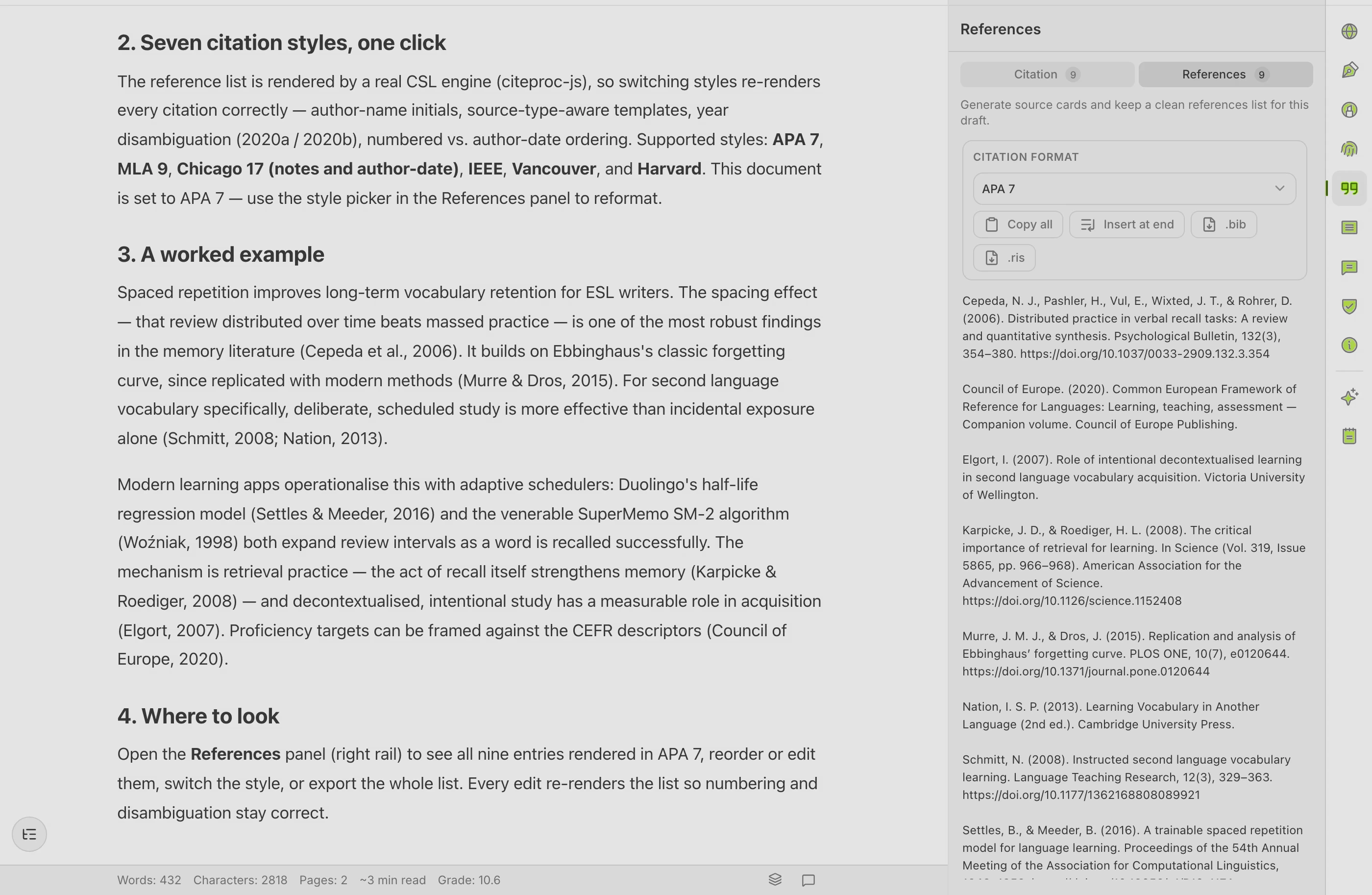
THE PIPELINE
One document, from first source to final submission
Each stage hands your sources and structure to the next — nothing re-typed, nothing re-broken.

Literature
Add sources by DOI, URL, or a BibTeX / RIS import. Your reading list and your reference library are the same list — no re-typing, no broken keys.

Outline
Plan the manuscript structure first. Sections carry their citations forward, so the argument and the evidence stay paired from the start.

Draft
Produce each section with help on register and phrasing — with first-language scaffolding toward the English draft when you need it.

Revise
Grammar, academic paraphrase, and an AI-detector preview run in the same document, not in three other tabs you have to reconcile.

Export
Word and PDF — citations and formatting intact — plus your reference list as BibTeX or RIS for whichever journal template you’re targeting.

Resubmit
Reviewer responses and revised drafts reuse the same reference library. Change one citation style and the whole manuscript follows.
THE COST OF TAB-SWITCHING
What gets lost between tools
Every hand-off is a place a reference can quietly break.
What breaks at the seams
- A citation you typed by hand that no longer matches the bibliography
- A source key that broke when you moved text between two tools
- A paraphrase that drifted from the original meaning
- A reference list you rebuilt from scratch for the second journal
What stays put in Copyeditor
- One reference library, cited once, reused everywhere
- In-text marks and bibliography rebuilt on a style switch
- Paraphrase that preserves meaning and attribution
- A single export with formatting and references intact
On authorship
A documented process you can show
The Authorship Certificate records how a manuscript took shape over time. It documents your writing process — useful when a journal, a co-author, or an institution asks how the work was produced. It does not prove legal innocence; it’s supporting evidence of authorship, nothing more and nothing less.
Questions researchers ask
How does it handle a multi-author manuscript?
Draft and export to Word for co-author review, then bring revisions back. The reference library and citation style travel with the document, so co-authors don’t inherit broken keys.
Can I keep using Zotero or Mendeley?
Sync is on the roadmap, not in the current beta. Today you can export your library from either manager as BibTeX or RIS and import it into Copyeditor, or add sources by DOI or URL.
What about LaTeX and Overleaf?
Full .tex export and Open-in-Overleaf are on the roadmap. Today you can export your reference list as a .bib file, so your sources are machine-readable when you move to a LaTeX workflow.
Is the AI going to write my results section?
No. It helps with structure, register, and phrasing — you produce the substance and approve every change. The Authorship Certificate documents that the writing process was yours; it’s evidence of process, not a guarantee of innocence.
Keep your citations
from outline to submission
We’re onboarding students and researchers first. Apply and we’ll reach out as spots open.
